

New 10 Character Design AI Prompts for Men’s Diverse Roles in Games, Comics, and Animation
Character design is the backbone of visual storytelling, whether you're building a game, illustrating a comic, or concepting an animated series. A well-crafted male character needs more than just a face—he needs a wardrobe, a posture, and an environment that tells his story without a single line of dialogue. This collection of 10 AI image prompts gives you a ready-to-use library of men's diverse roles, from old-money sophistication to high-fashion runway energy.
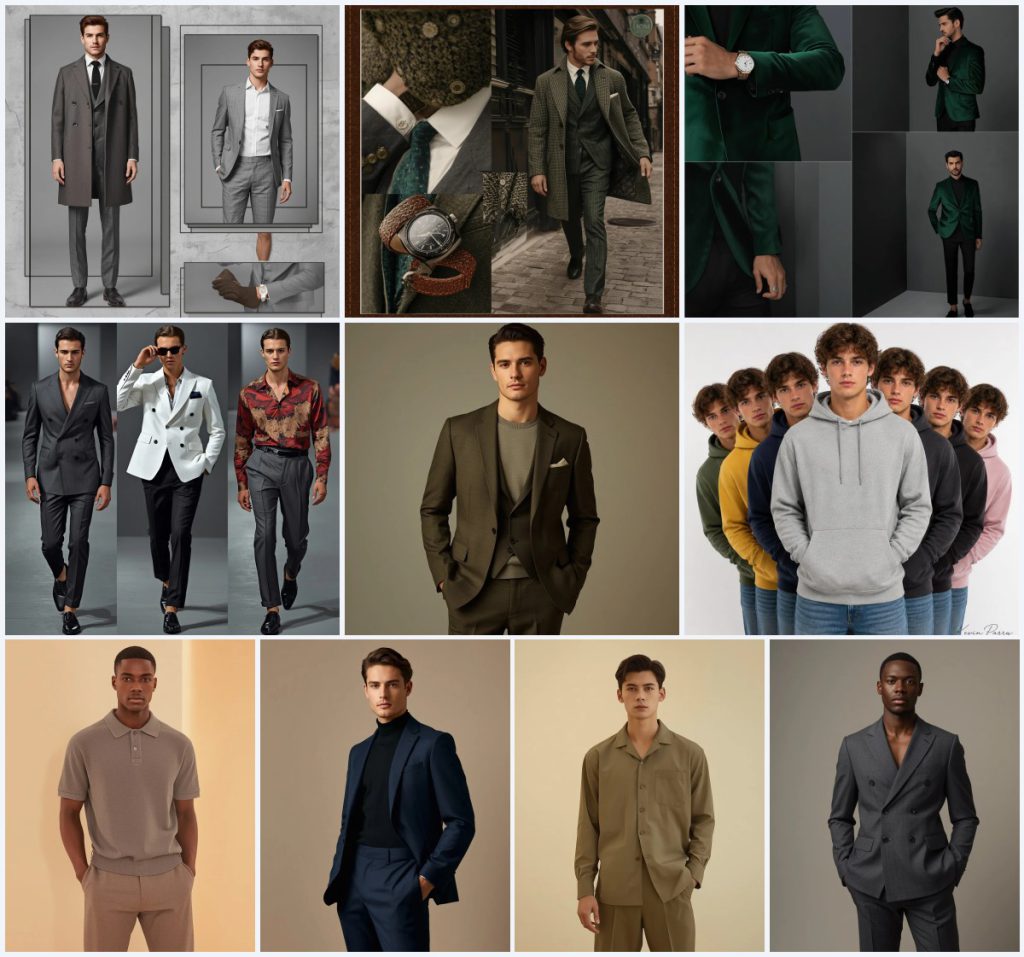
Each prompt in this set is built to produce ultra-realistic, editorial-quality images with precise details about fabric, lighting, and composition. The collection spans minimalist grey layouts, vintage leather-bordered collages, asymmetrical grids, and staggered streetwear lineups. You'll find prompts like "Minimalist Grey Layout with Tailored Charcoal Suit" and "Staggered Lineup Casual Hoodies Streetwear Male Portrait Design," all designed to spark fast creativity and consistent character exploration.
What this character design collection is asking for
This set of 10 prompts requests a series of sophisticated male character portraits and collages, each with a distinct fashion personality and compositional style. The focus is on modern western luxury and casual wear, rendered with cinematic lighting and ultra-realistic skin textures. Every prompt specifies a background, pose, and camera setup to guide the AI toward a polished, professional result.
- A handsome man as the central subject in every prompt
- Specific garments like a cashmere overcoat, tailored charcoal suit, emerald green velvet blazer, or grey cotton hoodie
- Backgrounds ranging from textured concrete to clean white seamless backdrops
- Lighting described as studio spotlighting, cinematic soft lighting, or high-contrast sharp lighting
- Camera details such as 8K resolution, 85mm lens, shallow depth of field, and high dynamic range
- Poses including walking down a runway, adjusting sunglasses, a confident standing pose, and a staggered lineup
The visual world these prompts build
The collection moves between polished studio environments and subtle narrative settings. In "Old Money Aesthetic with Classic Tweed Coat," the scene includes "a side profile walking down a cobblestone street" framed in a "vintage leather-bordered layout," grounding the luxury in a quiet, storied atmosphere. Other prompts stay strictly indoors, like "Sleek Minimalist Studio with Tailored Velvet Blazer," where the background is simply "a minimalist dark grey studio wall."
Even the more dynamic prompts maintain control. The "High Fashion Runway Collage with Chic Blazer Outfits" shows the subject "walking down a clean concrete runway, adjusting sunglasses," while the "Staggered Lineup Casual Hoodies Streetwear Male Portrait Design" places seven alternate versions of the same man against "a clean white seamless backdrop." Every clause is chosen to keep the character, not the environment, at the center of attention.
Why these prompts work for character design
These prompts excel because they combine fashion specificity with cinematic realism, giving AI models clear constraints without overcomplicating the request. The consistent focus on ultra-realistic skin, professional lighting, and high-resolution output ensures images that feel like production-ready character sheets or editorial spreads. This makes them immediately useful for concept artists, game designers, and social media content creators.
- They provide exact garment names and colors, reducing guesswork for the AI and giving you predictable, reusable character looks.
- The variety of layouts—collages, full-body shots, and staggered lineups—lets you explore a single character in multiple presentation formats.
- The prompts avoid fantasy or historical elements, keeping the results grounded in modern, relatable male archetypes that fit games, comics, and animation.
Three visual styles embedded in this collection
The prompts in this set can be generated in three distinct visual styles that the language already supports. You don't need to add or remove anything to shift between a clean fashion editorial, a cinematic character portrait, or a graphic collage layout.
- Editorial fashion photography: The prompts use terms like 'studio spotlighting,' 'high dynamic range,' and 'Instagram-ready, minimal aesthetic' to push a glossy magazine look.
- Cinematic realism: With 'cinematic lighting setup creates soft highlights and deep, balanced shadows' and 'shallow depth of field,' the style leans toward film-like character shots.
- Structured collage design: Phrases like 'clean, asymmetrical grid' and 'vintage leather-bordered layout' introduce a graphic, multi-panel composition that feels like a mood board.
How to generate these character designs step by step
Turning these prompts into usable character art is straightforward if you follow a clear workflow. The key is to treat each generation as a starting point, then refine based on what the AI returns. Below are six steps that take you from copying the prompt to checking critical details like hands and facial features.
- Copy the exact prompt text. Choose one prompt from the collection, such as 'Sophisticated Man in Elegant Olive Wool Suit,' and copy the full description without alterations.
- Upload a reference photo if needed. If you want the character to resemble a specific face or body type, upload a clear reference image to guide the AI while keeping the prompt's clothing and lighting instructions.
- Generate the initial image. Paste the prompt into your chosen AI tool and run it. For collages, the AI will interpret the layout instructions; for single portraits, it will focus on the pose and fabric details.
- Check the hands and fingers. Zoom in on any visible hands. If fingers are fused or misshapen, note that area for inpainting or regeneration with a negative prompt about hand deformities.
- Inspect the face and eyes. Look for asymmetrical pupils, blurred irises, or unnatural skin textures. The prompts request 'ultra-realistic skin with visible pores,' so any plastic-looking results need adjustment.
- Verify the main garment. Make sure the suit, blazer, or hoodie matches the described color and fit. If a 'taupe knit polo' comes out as grey or the fabric looks wrong, tweak the prompt slightly or use a variation seed.
Using a reference photo for consistent characters
A reference photo helps lock in a specific face, body type, or pose across multiple prompts in this collection. Since the prompts already describe clothing and lighting in detail, the reference mainly guides the AI on the subject's identity. Keep the reference clean and well-lit for the best blend with the prompt's cinematic style.
- Use a front-facing portrait with neutral expression and even lighting so the AI can map the face onto different outfits like the 'elegant navy wool suit' or 'classic grey cotton hoodie.'
- Avoid busy backgrounds in your reference; a plain wall lets the AI replace it with the prompt's 'textured concrete background' or 'soft warm ivory stone background' without artifacts.
- If you want consistency across the staggered lineup prompt, upload the same reference and let the AI vary only the hoodie colors as described.
AI tools best suited for this collection
Different AI image generators handle fashion detail, skin realism, and multi-panel layouts with varying success. The table below compares four popular tools based on how well they can execute the specific demands of these prompts, such as the 'clean, asymmetrical grid' or the 'staggered lineup' composition.
| Tool | Access | Typical realism | Useful here for |
|---|---|---|---|
| ChatGPT | Subscription | Good, with occasional softness | Generating the 'Old Money Aesthetic with Classic Tweed Coat' collage with its vintage leather-bordered layout |
| Google Gemini | Free tier available | High, strong fabric rendering | Creating the 'High Fashion Runway Collage' where the ivory white casual blazer needs crisp, realistic fabric folds |
| Leonardo AI | Freemium | Very high, cinematic quality | Rendering the 'Sophisticated Man in Elegant Olive Wool Suit' with its required cinematic lighting and visible skin pores |
| Midjourney | Subscription | Excellent, editorial grade | Producing the 'Staggered Lineup Casual Hoodies Streetwear Male Portrait Design' with seven distinct hoodie colors on a clean white backdrop |
Three tips for getting the best results
Small adjustments to your workflow can dramatically improve the output when working with these character design prompts. The tips below focus on real materials and objects named in the collection to keep your generations accurate and visually striking.
- Emphasize the cashmere overcoat in the minimalist grey layout prompt by adding a negative prompt for 'rough wool' if the AI confuses the fabric texture.
- For the emerald green velvet blazer, increase the contrast slightly in post-processing to make the velvet's light-catching quality pop against the dark grey studio wall.
- When generating the staggered hoodie lineup, check that the pastel pink hoodie doesn't bleed into the white seamless backdrop; use a subtle edge mask if needed.
Common issues and how to fix them
Even well-written prompts can produce flawed images. The table below lists four failures these prompts are prone to, along with simple changes to correct them without rewriting the entire prompt.
| Issue | What to change |
|---|---|
| Fabric looks flat or plastic instead of wool or velvet | Add 'visible fabric texture, natural fiber weave' to the prompt or increase the weight of words like 'wool suit' and 'velvet blazer.' |
| Collage panels overlap or merge into a single image | Strengthen the layout description with 'clearly separated panels, thin black borders between frames' in prompts like the vintage leather-bordered layout. |
| Facial features are asymmetrical or eyes look dead | Add 'symmetrical face, lively catchlights in eyes' and use a face-restoration tool after generation if the issue persists. |
| The staggered lineup shows identical hoodie colors instead of distinct ones | List the colors with commas and add 'each hoodie a unique solid color' to reinforce the variation in the prompt. |
Frequently Asked Questions
Can I use these prompts to create a consistent character across multiple images?
Yes, the collection is designed for consistency. By using the same reference photo and keeping the face description stable, you can generate the same man in a charcoal grey double-breasted suit, a taupe knit polo, and a casual grey cotton hoodie while maintaining his identity.
Do these prompts work for non-photorealistic styles like comic art?
The prompts specify ultra-realistic skin, 8K resolution, and cinematic lighting, so they are tuned for photorealism. To adapt them for comics or animation, you would need to replace those terms with stylistic keywords like 'cel-shaded,' 'line art,' or 'anime style.'
Why are there multiple collage prompts instead of just single portraits?
Collages let you showcase a character's wardrobe and attitude in one image, which is especially useful for character design pitches. Prompts like 'Minimalist Grey Layout with Tailored Charcoal Suit' show multiple outfits and poses in a single generation, saving time during the concept phase.
Conclusion
This collection of 10 character design AI prompts gives you a versatile toolkit for generating modern male characters across games, comics, and animation. From the quiet luxury of an olive wool suit to the energetic streetwear of a staggered hoodie lineup, each prompt is built to deliver detailed, realistic results with minimal tweaking. Use them as they are, mix and match elements, or build on them to create your own signature character library—the foundation is solid and ready for your creative direction.
Remember to only use and edit a reference photo that you own or have explicit permission to modify, ensuring your final character art is ethically sound and ready to share.