

Best 10 Embroidered Saree AI Prompts for Intricate Detail and Craftsmanship
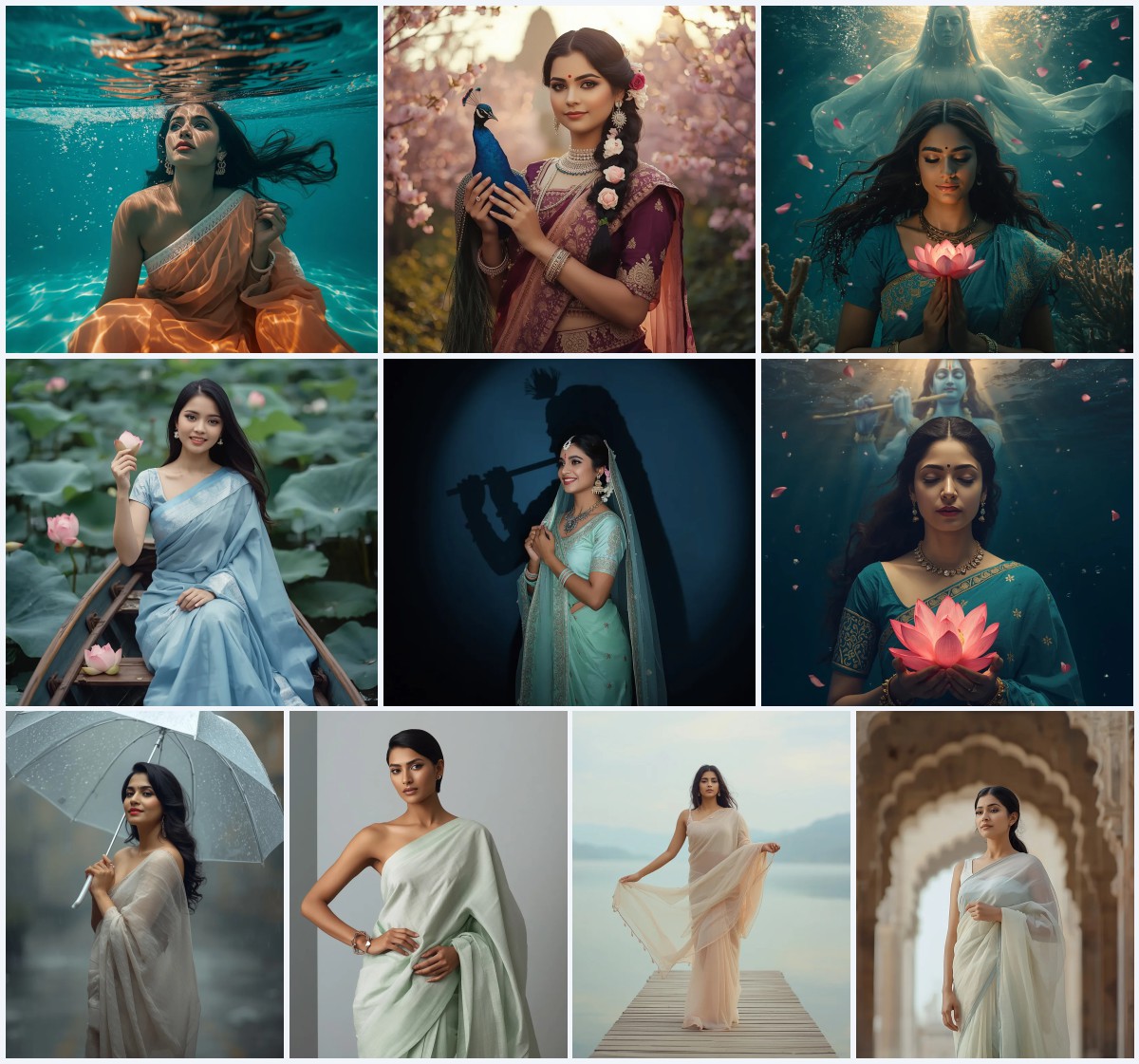
Embroidered sarees are a celebration of texture, tradition, and artistry, and AI image generators can now bring their intricate details to life with breathtaking realism. This collection of ten prompts pushes the boundaries of digital craftsmanship, blending luxurious fabrics with surreal, architectural, and cosmic settings. Each prompt is designed to inspire photographers, fashion enthusiasts, and digital artists seeking to create visuals that honor the saree's heritage while exploring bold, contemporary aesthetics.
From the shimmering heat of a desert oasis to the shattered reflections of a dynamic dance, these prompts capture the saree in motion, light, and emotion. The focus on ultra-realistic rendering, 8K resolution, and precise lens choices ensures every sequin, crystal, and silk fold is rendered with stunning clarity. Whether you are crafting a fashion-forward collage or a mystical forest portrait, these prompts offer a versatile toolkit for generating images that feel both timeless and avant-garde.
What these embroidered saree prompts are asking for
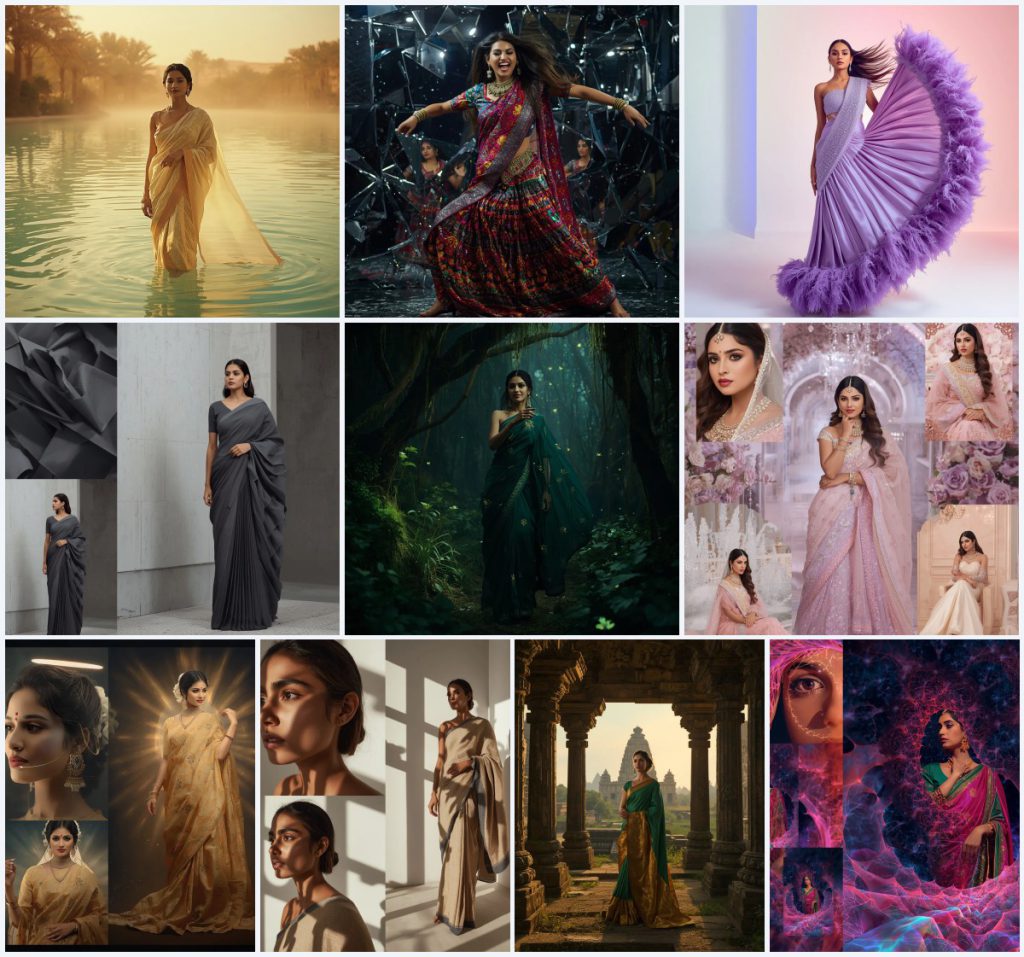
This collection calls for ten distinct AI-generated portraits of Indian women wearing heavily embellished sarees, each set in a unique environment that amplifies the garment's texture and mood. The prompts demand ultra-realistic detail, specifying fabric types like golden silk, sequins, Swarovski crystals, khadi, and brocade, alongside atmospheric elements such as heat haze, bioluminescence, and shattered mirrors. The common thread is a celebration of intricate craftsmanship, where every pleat, shadow, and reflection contributes to a visually rich narrative.
- Golden silk saree shimmering in a desert oasis with heat haze distortion and turquoise water reflections
- Multi-colored sequin saree fragmented in a shattered mirror dance scene with theatrical sparkles
- Powder violet silk saree with Swarovski crystal blouse and 3D feather fringes in a pastel gradient studio
- Architectural modern saree in charcoal and steel gray, draped with sharp pleats in a Brutalist setting
- Forest green georgette saree with glowing bioluminescent embroidery in an enchanted forest
- Pastel saree in a diamond rosewater palace with crystal fountains and reflective marble interiors
The visual world these prompts build
The scenes range from natural wonderlands to abstract geometric spaces, each tailored to the saree's character. In the desert mirage prompt, the subject "appears as a mirage in a vast desert oasis," with "shimmering turquoise waters" and "date palms swaying gently" creating a dreamlike isolation. The shattered mirror prompt transforms a dance pose into a fragmented spectacle, where "each shard reflects her movement and the dazzling sequins," generating a "kaleidoscope of action" against a dark, abstract backdrop.
Other settings lean into fantasy and futurism. The enchanted forest prompt places the subject "deep within an enchanted forest, where ancient trees are covered in glowing moss," while the architectural collage uses "dramatic, high-key lighting with sharp shadows" to emphasize the saree's sculptural form. The celestial halo prompt envelops the figure in a "soft, ethereal celestial halo effect" against a "deep, cosmic gradient with distant stars," and the fractal geometry collage multiplies her image within "intricate, glowing fractal geometry" that echoes the saree's vibrant fuchsia and emerald green.
Why these prompts captivate
- They merge traditional Indian textiles with high-concept visual storytelling, making each image feel like a couture editorial or a cinematic still.
- The emphasis on textures—sequins, brocade, khadi, Swarovski crystals—challenges AI to produce hyper-detailed fabric rendering that appeals to fashion designers and textile enthusiasts.
- The variety of lighting scenarios, from golden hour ruins to neon-infused fractals, teaches prompt engineers how to control mood and realism across different genres.
Three visual styles that emerge from these prompts
Although the collection spans ten prompts, three distinct visual styles dominate the aesthetic, each leveraging the saree's embellishments in a unique way. These styles are not separate genres but natural outcomes of the prompt details, ensuring every generated image remains faithful to the original description.
- Surreal Portraiture: The desert mirage and shattered mirror prompts use atmospheric distortion and fragmentation to create dreamlike, emotionally charged portraits.
- Architectural Fashion: The Brutalist collage and geometric shadow prompts treat the saree as a structural element, using sharp lines and high contrast to highlight its form.
- Luminous Fantasy: The bioluminescent forest and celestial halo prompts bathe the saree in soft, otherworldly light, enhancing its embroidery with a magical glow.
How to generate these embroidered saree images
Creating these intricate portraits requires a methodical approach to prompt entry, reference usage, and post-generation checks. Follow these six steps to achieve the ultra-realistic results described in the prompts.
- Copy the prompt text exactly. Select one prompt from the collection, such as the desert oasis or fractal collage, and copy its full description without any alterations.
- Upload a reference photo. If your AI tool supports image inputs, upload a clear photo of a saree with similar embroidery or a reference pose to guide the composition and fabric drape.
- Generate the initial image. Paste the prompt into your chosen AI image generator and run it at the highest available resolution, using settings like 8K or HDR if supported.
- Check the hands and fingers. Examine the generated hands for extra digits or unnatural bends. If distorted, add negative prompts like "deformed hands" and regenerate.
- Inspect the face and expression. Ensure the face matches the described mood—gentle smile, fierce joy, or contemplative expression—and that eyes are symmetrical and sharp.
- Verify the saree details. Zoom in on the embroidery, sequins, or crystal work to confirm they are crisp and match the prompt's material description, such as golden silk or khadi texture.
Choosing the right reference photo
A well-chosen reference photo can dramatically improve the accuracy of fabric textures and poses in these prompts. The AI uses the reference to anchor its interpretation of intricate details like zari work or feather fringes, so select an image that aligns with the prompt's core elements.
- Use a high-resolution photo of a saree with similar embroidery, such as a golden brocade or sequin design, to guide the AI's texture generation.
- Include a reference with the desired pose, like a twirling motion or a seated glamour shot, to help the AI replicate the dynamic movement described in prompts like the shattered mirror dance.
- Ensure the lighting in your reference matches the prompt's mood—soft, diffused light for the bioluminescent forest or harsh, directional light for the geometric shadows collage.
Best AI tools for these saree prompts
Different AI image generators excel at different aspects of these prompts, from fabric realism to atmospheric lighting. The table below compares four popular tools based on their accessibility, typical realism, and specific strengths for this collection.
| Tool | Access | Typical realism | Useful here for |
|---|---|---|---|
| ChatGPT | Free and paid tiers | High with detailed prompting | Rendering the heat haze distortion on the golden silk saree in the desert oasis scene |
| Google Gemini | Free with Google account | Moderate to high | Capturing the sharp geometric shadows on the textured khadi saree in the abstract collage |
| Leonardo AI | Freemium with daily credits | Very high, especially with fine-tuning | Generating the glowing bioluminescent embroidery on the forest green georgette saree |
| Midjourney | Paid subscription only | Excellent for artistic and cinematic styles | Producing the diamond rosewater palace setting with crystal fountains and pastel saree reflections |
Three tips for better embroidered saree results
Small adjustments to your workflow can significantly enhance the intricacy and realism of the generated saree images. These tips focus on specific materials and objects mentioned across the prompts to help you achieve the desired craftsmanship.
- Emphasize the Swarovski crystal blouse by adding "sparkling light reflections" to your prompt, which forces the AI to render individual crystal facets more distinctly.
- For the khadi saree, use negative prompts like "smooth silk" to ensure the AI generates the rough, handwoven texture instead of a glossy finish.
- When generating the sequin saree, include a separate prompt variation with "macro lens" to get a close-up shot that highlights the scattered sparkles from the shattered mirror shards.
Common issues and how to fix them
Even with detailed prompts, AI image generators can introduce artifacts or misinterpret elements. The table below identifies four frequent problems with these embroidered saree prompts and offers practical solutions.
| Issue | What to change |
|---|---|
| Bioluminescent embroidery appears as flat neon paint | Add "subtle glow, soft light emission from thread" and reduce the overall brightness in your prompt |
| Shattered mirror shards look like random glass pieces without reflections | Specify "each shard reflects a fragment of the saree and the woman's movement" and use a higher step count |
| Fractal patterns overwhelm the subject | Reduce the fractal complexity by adding "simple, repeating geometric patterns" and lower the CFG scale |
| The golden silk saree loses its texture in the heat haze | Add "visible silk weave texture despite the distortion" and use a reference image with clear fabric details |
Frequently Asked Questions
Can I mix elements from different prompts in this collection?
Yes, you can combine details like the bioluminescent embroidery from the forest prompt with the shattered mirror background to create a hybrid image. Just ensure the lighting descriptions are consistent to avoid conflicting shadows.
Why does my AI tool struggle with the 3D feather fringes on the violet saree?
Feather fringes require precise depth rendering, which some models misinterpret as flat textures. Try adding "individual feather strands with soft shadows" and use a tool like Leonardo AI that excels at fine detail.
How do I maintain the ultra-realistic look across all ten prompts?
Stick to the specified camera settings like 85mm lens, HDR, and 8K resolution in every generation. Also, use a consistent negative prompt for common artifacts like "blurry textures, plastic skin, distorted fabric."
Conclusion
This collection of ten embroidered saree AI prompts is a masterclass in blending traditional craftsmanship with cutting-edge image generation. Each prompt offers a unique window into the saree's versatility, from the ethereal glow of a celestial halo to the stark geometry of Brutalist architecture. By following the detailed instructions for reference photos, tool selection, and issue troubleshooting, you can produce images that rival high-end fashion photography. The key is to treat every element—fabric, light, and composition—as an opportunity to push the AI's capabilities while staying true to the saree's intricate beauty.
Remember to only edit a photo you have the legal right to modify, ensuring your creative work respects the original image's permissions.