

New 10 Ultra Realistic AI Prompts for Men’s Cinematic Portraits with DSLR Quality and Professional Grading
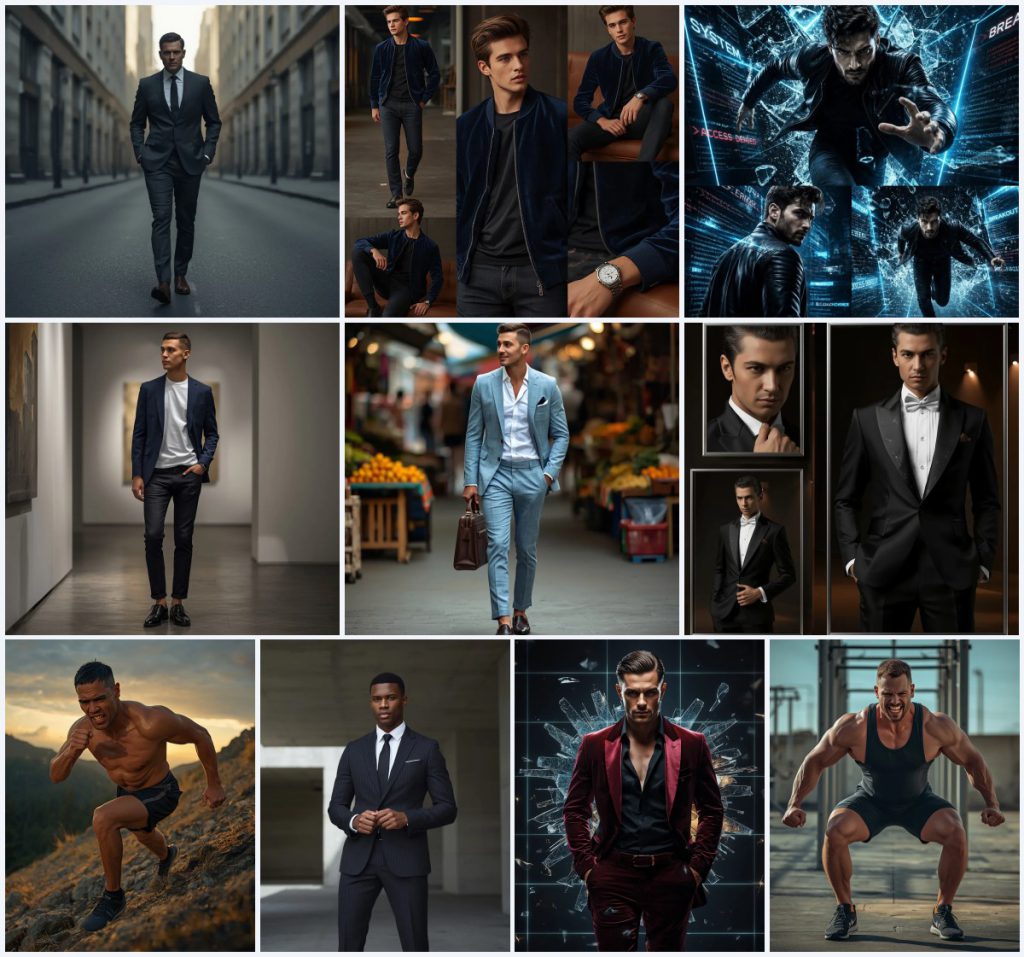
Men's portrait photography has entered a new era where AI can generate cinematic, hyper-realistic images that rival professional DSLR shoots. This collection of ten prompts from Instant Prompt focuses on powerful, stylish male figures in diverse settings, from deserted city streets to high-tech digital breakouts.
Each prompt is crafted to deliver 8K ultra HD resolution, shallow depth of field, and HDR grading, ensuring every skin texture and fabric fold looks tangible. Whether you need editorial fashion, intense athleticism, or avant-garde collage art, these prompts give you a fast, creative starting point.
What this men's cinematic portrait collection is asking for
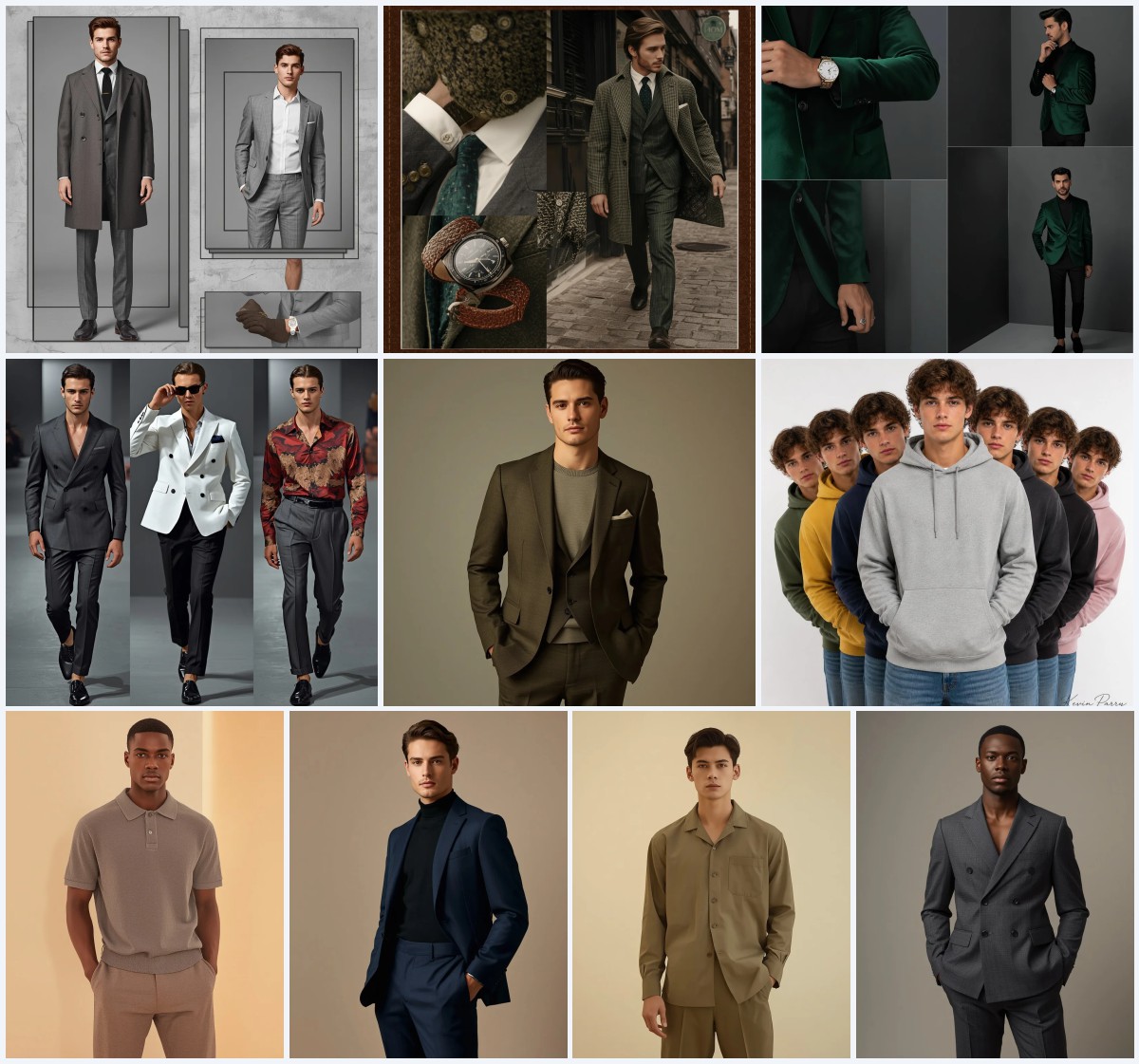
This set of ten prompts depicts a range of powerful, modern men in carefully styled attire and dramatic environments. Every prompt emphasizes ultra-realistic skin texture, professional lighting, and a strong sense of presence, turning each image into a cinematic still.
- A dark grey suit, white shirt, and black tie on a man walking a deserted dawn street
- A navy blue velvet bomber jacket with a black silk tee and dark wash jeans in an urban loft collage
- A black leather jacket and slim-fit trousers breaking through a neon cyber screen with glass shards
- A light blue linen suit, loafers, and a leather briefcase in a European market
- An avant-garde western tuxedo with silk lapels and a subtle geometric pattern in a dark minimalist loft
- Bare-chested athletic wear with dark shorts and trainers during an intense hill sprint at dawn
The visual scene and atmosphere in these prompts
The scenes range from a "deserted city street at dawn" with "long shadows, and a pale pre-dawn sky" to a "vibrant European market" filled with "blurred stalls, fresh produce, and local vendors." Each backdrop is chosen to amplify the man's mood—whether it's the stark isolation of "minimalist concrete architecture" or the warm, industrial glow of a "modern urban loft."
Lighting plays a crucial role, described in clauses like "cold, diffused early morning light" for a contemplative walk, or "harsh, direct sunlight creates strong highlights and shadows" for an intense training scene. In the digital art pieces, "high-contrast cybernetic lighting" and "glowing neon cyber screen" shards push the atmosphere into futuristic territory, while the gallery scene uses "soft, diffused gallery lighting" for a cultured, refined feel.
Why these prompts work for fast, high-impact creativity
These prompts are engineered to produce magazine-cover results with minimal tweaking. They combine precise wardrobe details, dynamic poses, and cinematic lighting cues that AI models interpret consistently, giving you a professional-grade portrait in one generation.
- The mix of formal, casual, and avant-garde outfits lets you generate versatile portfolio images without changing the core prompt structure.
- Each prompt includes camera specs like '70mm lens' or 'shallow depth of field,' which direct the AI to mimic real DSLR optics and bokeh.
- The emotional range—from stoic determination to relaxed charm—ensures you can create a cohesive story across multiple images for branding or social media.
Three visual styles you can apply within this collection
These prompts already contain three distinct visual approaches: cinematic realism, editorial collage, and digital screen-breakout art. You do not need to add external style keywords; each prompt's internal language directs the AI toward one of these three looks.
- Cinematic realism: The dawn street walk and European market stroll use natural light and candid poses to feel like movie stills.
- Editorial collage: The navy velvet bomber and western tuxedo prompts arrange multiple poses in clean grids with metallic frames for a high-fashion spread.
- Digital breakout art: The leather jacket and burgundy velvet suit prompts feature shattered screens, neon grids, and glitch text for a viral, futuristic edge.
How to generate and refine these portraits
Start by copying the full prompt text and pasting it into your chosen AI image generator. If the tool allows, upload a reference photo of a male model with similar lighting and pose to guide the output. After generating, inspect the hands, face, and main clothing item closely for distortions.
- Copy the prompt. Select one prompt from the collection and copy its entire text, including camera and resolution details.
- Upload a reference. In tools like Midjourney or Leonardo AI, add a reference image of a man in a similar stance and lighting to improve accuracy.
- Generate the image. Paste the prompt and run the generation. Use a 1:1 or 3:4 aspect ratio for portraits, depending on the composition.
- Check the hands. Zoom in on the hands. If fingers are fused or extra digits appear, use an inpainting feature or regenerate with a higher CFG scale.
- Check the face. Ensure the eyes, nose, and mouth align naturally. Slight asymmetry can be fixed with face-restoration tools like GFPGAN.
- Check the main object. For the leather jacket or velvet suit, verify that textures, seams, and reflections look realistic and free of warping.
Using a reference photo to boost realism
A well-chosen reference photo can anchor the AI's output in real human anatomy and lighting. Pick a shot that matches the prompt's mood and angle as closely as possible.
- Select a reference with similar lighting direction—for the dawn street prompt, use a photo taken in soft side light rather than harsh midday sun.
- Match the pose loosely. A reference of a man walking with hands in pockets will guide the AI toward the 'hands in his pockets' detail in the dark suit prompt.
- Ensure the reference model's build and hair length are comparable to the prompt's description, like 'short, dark hair' or a 'sharp jawline,' to minimize face mismatches.
AI tools suited for these cinematic male portraits
Different AI image generators handle realism, fabric textures, and lighting nuances with varying success. The table below compares four popular tools for this prompt collection.
| Tool | Access | Typical realism | Useful here for |
|---|---|---|---|
| ChatGPT | Free tier available | Good with DALL-E integration | Rendering the subtle pinstripe on the dark charcoal suit accurately |
| Google Gemini | Free tier available | Moderate to high | Capturing the 'harsh, raw natural light' on the bare-chested training scene |
| Leonardo AI | Freemium | High with fine-tuned models | Producing the 'glowing blue wireframe lines' and glass shards in the cyber breakout |
| Midjourney | Paid subscription | Very high, cinematic | Nailing the 'soft, diffused gallery lighting' and abstract paintings in the gallery opening prompt |
Tips for getting the most from these prompts
Small adjustments to your workflow can dramatically improve the output quality. Focus on the materials and objects named in the prompts to maintain consistency.
- For the navy blue velvet bomber jacket, add 'velvet texture map' or 'fabric sheen' in a negative prompt field if the AI makes it look like leather.
- When generating the silver watch close-up in the casual chic collage, use an upscaler to preserve the metallic reflections and fine bracelet links.
- In the European market prompt, if the leather briefcase looks flat, increase the contrast slightly in post-processing to bring out the 'sophisticated leather' depth.
Common issues and quick fixes for these prompts
Even with detailed prompts, AI can misinterpret certain elements. The table below lists typical failures and the specific changes to resolve them.
| Issue | What to change |
|---|---|
| The dark grey suit appears black or navy | Add 'medium grey suit, not black' to the prompt and reduce shadow strength in the lighting keywords |
| Glass shards in the cyber breakout look like plastic | Include 'sharp refractive glass, crystalline edges' and increase the weight of 'high-contrast cybernetic lighting' |
| The man's face looks expressionless instead of stoic | Add 'micro-expression, subtle brow tension' and lower the guidance scale to allow more variation |
| The athletic trainer's sweat looks like oil or gel | Replace 'glistening with sweat' with 'fine sweat droplets, realistic perspiration' and use a realism-focused model |
Frequently Asked Questions
Can I mix elements from different prompts in this collection?
Yes, you can combine details like the 'bespoke light blue linen suit' from the European market prompt with the 'minimalist concrete architecture' backdrop from the confident man prompt. Just keep the camera specs consistent to maintain the 8K realism.
Why do the collage prompts include multiple poses in one image?
The collage prompts, such as the navy velvet bomber and western tuxedo, are designed to mimic editorial fashion spreads. They instruct the AI to arrange several poses in a 'clean grid with subtle drop shadows,' giving you a ready-to-use multi-angle portfolio piece.
How do I ensure the man's hair stays 'neatly combed' or 'impeccably styled' in every generation?
If the AI produces messy hair, add 'slicked back, no flyaways' or 'precision side part' to the prompt. Using a reference photo with a similar hairstyle also locks in the grooming detail more reliably.
Conclusion
This collection of ten ultra-realistic men's cinematic portrait prompts offers a fast track to professional-grade AI imagery. By understanding the scene details, applying the built-in styles, and using the right tools and fixes, you can generate striking portraits that look like they were shot on a DSLR with expert color grading. Keep experimenting with the wardrobe cues and lighting directions to build a diverse, high-impact visual library.
Always ensure you have the right to edit any reference photo you upload, and make it your own with thoughtful adjustments.